
ETS2 retarder guide
Have you ever wanted to change the traffic/time/weather in the game? Or maybe just teleport to another location without even moving a cm with your truck? Well, for any of those cases, you need to first activate the console in the game.
And in this guide I’ll show exactly how to do so, and, at the end, I’ll also share with you some console commands that I’m sure you’ll find useful. 😉
how to activate the console
1. First, you need to open the file explorer and locate the Euro Truck Simulator 2 folder in Documents.
2. Open the folder and scroll down until you see a file named “config.cfg“. Right click and select “Open With”, and select “Notepad”.
3. Now, locate the following entries. You can locate them faster if you press Ctrl + F and copy them in the search box that will open:
- g_console
- g_developer


4. As you can see in the image above, the values of those fields are both 0. Change their values from 0 to 1.
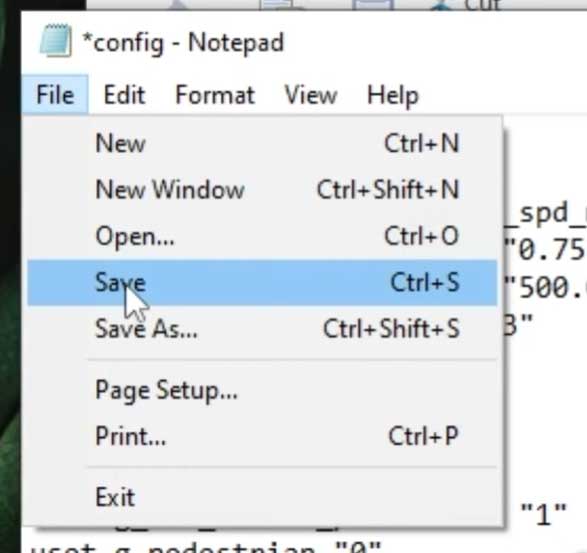
5. Go to the File menu at the top left side of the window and click “Save” and close everything you opened.
6. Now you can launch the game
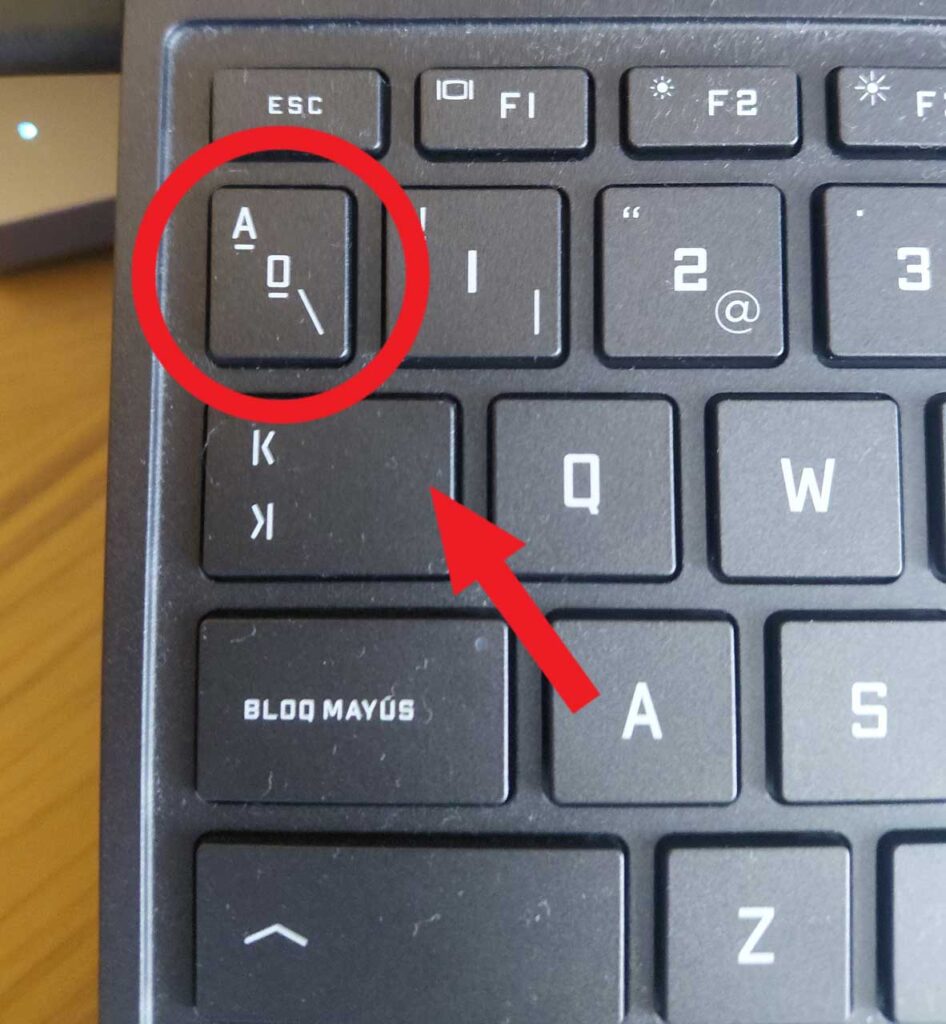
To open the console, you need to press the button that is above that tab and below the esc (check the image below), you now have access to the developer console from which you can set a lot of different things, like changing the weather, the time, skyboxes, etc.
Useful console commands for ETS2/ATS
- g_set_traffic [0 or 1]: 0 removes all the traffic from the game (useful when the AI messes things up…), and 1 adds the default traffic back again.
- g_set_time [0-24]: changes the actual time of the game to the one specified. Keep in mind that your rest time will also change; this means that if you advance many hours, you’ll probably be dozing from time to time until you find a resting place.
- g_set_skybox [0-13]: changes the global illumination of the game when changing the skybox. It can be foggy, cloudy, sunny, overcast, etc.
- g_set_weather [1 or 2]: makes it rain or not.
- goto [name of city]: Teleports you to any city that you want at no cost. Use only lowercase. For example: goto london.
- exit, quit: closes the game instantly.
If you have any question or issue, feel free to go to my YouTube video where I cover this topic and leave a comment. You can also check the comments of the video if your issue has already been fixed for another person.
If you found this guide helpful, I remind you that I have more like this one on this web or on my YouTube channel, you can go check them out if you want!
